26 May 2019

Windows 10 1903 Update

Microsoft has officially released Windows 10 May 2019 Update for the public. Also known as version 1903. You can Direct Download Windows 10 May 2019 Update from Update settings other wise you can update through windows update Assistant this is the Best way to update windows 10 1903.


So If you are ready to install the update, open your Windows Update settings 
(Settings > Update & Security > Windows Update) and select Check for updates. Once the update appears, you can select Download and install


Back HOME Next

14 Feb 2018

Most useful websites list


1.      goo.gl – shorten long URLs and convert URLs into QR codes.

2.     bing.com/images – automatically find perfectly-sized wallpapers for mobiles.
3.     boxoh.com – track the status of any shipment on Google Maps – alternative.
4.     bubbl.us – create mind-maps, brainstorm ideas in the browser.
5.     builtwith.com – find the technology stack to know everything about a website.
6.     codeacademy.com – the best place to learn coding online.
7.     copypastecharacter.com – copy special characters that aren’t on your keyboard.
8.     coralcdn.org – if a site is down due to heavy traffic, try accessing it through coral CDN.
9.     ctrlq.org/html-mail – send rich-text mails to anyone, anonymously.
10. ctrlq.org/screenshots – for capturing screenshots of web pages on mobile and desktops.
11. ctrlq.save – save online files to Dropbox or Google Drive directly.
12. ctrql.rss – a search engine for RSS feeds.
13. deadurl.com – you’ll need this when your bookmarked web pages are deleted.
14. dictation.io – online voice recognition in the browser itself.
15. disposablewebpage.com – create a temporary web page that self-destruct.
16. downforeveryoneorjustme.com – find if your favorite website is offline or not?
17. draw.io – create diagrams and flowcharts in the browser, export your drawings to Google Drive and Dropbox.
18. e.ggtimer.com – a simple online timer for your daily needs.
19. everytimezone.com – a less confusing view of the world time zones.
20. ewhois.com – find the other websites of a person with reverse Analytics lookup.
21. faxzero.com – send an online fax for free – see more fax services.
22. feedmyinbox.com – get RSS feeds as an email newsletter.
23. fiverr.com – hire people to do little things for $5.
24. flightstats.com – Track flight status at airports worldwide.
25. followupthen.com – the easiest way to setup email reminders.
26. formspring.me – you can ask or answer personal questions here.
27. ge.tt – qiuckly send a file to someone, they can even preview it before downloading.
28. goo.gl – shorten long URLs and convert URLs into QR codes.
29. google.com/history – see your past searches, also among most important Google URLs
30. google.com/webfonts – a good collection of open source fonts.
31. gtmetrix.com – the perfect tool for measuring your site performance online.
32. homestyler.com – design from scratch or re-model your home in 3d.
33. hundredzeros.com – the site lets you download free Kindle books.
34. iconfinder.com – find icons of all sizes.
35. ifttt.com – create a connection between all your online accounts.
36. imo.im – chat with your buddies on Skype, Facebook, Google Talk, etc. from one place.
37. iwantmyname.com – helps you search domains across all TLDs.
38. join.me – share you screen with anyone over the web.
39. jotti.org – scan any suspicious file or email attachment for viruses.
40. kleki.com – create paintings and sketches with a wide variety of brushes.
41. kuler.adobe.com – get color ideas, also extract colors from photographs.
42. labnol.org – software tutorials and how-to guides.
43. liveshare.com – share your photos in an album instantly.
44. livestream.com – broadcast events live over the web, including your desktop screen.
45. lmgtfy.com – when your friends are too lazy to use Google on their own.
46. lovelycharts.com – create flowcharts, network diagrams, sitemaps, etc.
47. mailvu.com – send video emails to anyone using your web cam.
48. marker.to – easily highlight the important parts of a web page for sharing.
49. midomi.com – when you need to find the name of a song.
50. minutes.io – quickly capture effective notes during meetings.
51. mixlr.com – broadcast live audio over the web.
52. mondrian.io – create vector drawings in the browser
53. myfonts.com/WhatTheFont – quickly determine the font name from an image.
54. noteflight.com – print music sheets, write your own music online (review).
55. notes.io – the easiest way to write short text notes in the browser.
56. office.com – download templates, clipart and images for your Office documents.
57. onlineocr.net – recognize text from scanned PDFs – see other OCR tools.
58. otixo.com – easily manage your online files on Dropbox, Google Docs, etc.
59. pancake.io – create a free and simple website using your Dropbox account.
60. pdfescape.com – lets you can quickly edit PDFs in the browser itself.
61. picmonkey.com – Picnik is offline but PicMonkey is an even better image editor.
62. pipebytes.com – transfer files of any size without uploading to a third-party server.
63. polishmywriting.com – check your writing for spelling or grammatical errors.
64. printwhatyoulike.com – print web pages without the clutter.
65. privnote.com – create text notes that will self-destruct after being read.
66. qClock – find the local time of a city using Google Maps.
67. radbox.me – bookmark online videos and watch them later (review).
68. random.org – pick random numbers, flip coins, and more.
69. regex.info – find data hidden in your photographs – see more EXIF tools.
70. safeweb.norton.com – check the trust level of any website.
71. scr.im – share you email address online without worrying about spam.
72. screenr.com – record movies of your desktop and send them straight to YouTube.
73. scribblemaps.com – create custom Google Maps easily.
74. seatguru.com – consult this site before choosing a seat for your next flight.
75. similarsites.com – discover new sites that are similar to what you like already.
76. snopes.com – find if that email offer you received is real or just another scam.
77. spypig.com – now get read receipts for your email.
78. stupeflix.com – make a movie out of your images, audio and video clips.
79. sumopaint.com – an excellent layer-based online image editor.
80. tagmydoc.com – add QR codes to your documents and presentations (review).
81. talltweets.com – Send tweets longer than 140 characters.
82. teuxdeux.com – a beautiful to-do app that looks like your paper dairy.
83. timerime.com – create timelines with audio, video and images.
84. tinychat.com – setup a private chat room in micro-seconds.
85. translate.google.com – translate web pages, PDFs and Office documents.
86. tubemogul.com – simultaneously upload videos to YouTube and other video sites.
87. typewith.me – work on the same document with multiple people.
88. typingweb.com – master touch-typing with these practice sessions.
89. unfurlr.come – find the original URL that’s hiding behind a short URL.
90. unsplash.com – download images absolutely free.
91. urbandictionary.com – find definitions of slangs and informal words.
92. wetransfer.com – for sharing really big files online.
93. whichdateworks.com – planning an event? find a date that works for all.
94. whoishostingthis.com – find the web host of any website.
95. wolframalpha.com – gets answers directly without searching   – see more wolfram tips.
96. woorank.com – research a website from the SEO perspective.
97. wordle.net – quick summarize long pieces of text with tag clouds.
98. youtube.com/disco – quickly create a video playlist of your favorite artist.
99. youtube.com/leanback – Watch YouTube channels in TV mode.
100.                    zerodollarmovies.com – find full-length movies on YouTube.
101.                    zoom.it – view very high-resolution images in your browser without scrolling.

Back HOME Next

4 Feb 2018

ACTIVE DIRECTORY DOMAIN SERVICE

ACTIVE DIRECTORY DOMAIN SERVICE
It is a centralized database management system that store information about   user,computer,groups,printers,security settings,server configuration,Network infrastructure configuration and so on centrally.

#Directory service(DS):-Developed by IETF.
Directory service define the relationship between two object in any manner.It use protocol called LDAP (Lightweight directory access protocol) port no 389.

 #AD DS has following features:-

  • It manages user logon process,authentication and directory searches.
  • It manages the communication between user and domains.
  • It stores directory data (called directory store), also AD DS has a mechanism to locate and retrieve information from the system.
  • By using AD DS, we can implement a centralized control all the available resources (like user, computers and data access) inside the company.
  • Server running AD DS is called as domain controler.
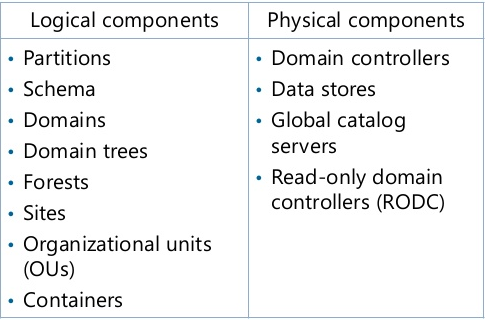
#Component of AD DS:-

#Forest:-
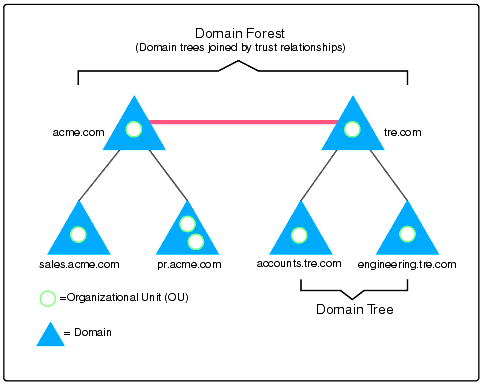
  • It is a grouping or hierarchical arrangement of one or more separate independent domain trees.
  • It has highest level in the Active Directory.
  • It is the logical security boundary for an Enterprise.
  • It shares the sinfle database and a single global address list.
  • It contains one or more domain container objects like Directory Structure,Global Catalog and Directory Schema etc.
  • A forest contains multiple domain trees.The first domain in the forest is called as a Forest Root Domain.
  • By default a user or administrator of one forest cannot access another forest.
Image result for ad ds forest

#Domain:-
  • It is logical security boundary that store information about user,group,computer,printer etc.
  • It have a fully Qualified domain name(FQDN)  that identified a domain name in enterprise network.
  • A Domain is managed by a physical machine known as Domain controller.
  • A domain managed by a domain controller is used to provide authentication service and authorization for the objects stored in its database.
  • All domain controllers hold a copy of the domain database, this domain database is continuously synchronized.
#Domain Tree:-
  • Two or more Domains that share common schema and global catalog.
  • It is a collection of domains grouped together in a hierarchical structure.
  • Domain tree support parent-child concept(parent domain and child domain)
  • It contains Namespace like enhanceofit.com(parent domain) and delhi.enhanceofit.com(child domain of parent).